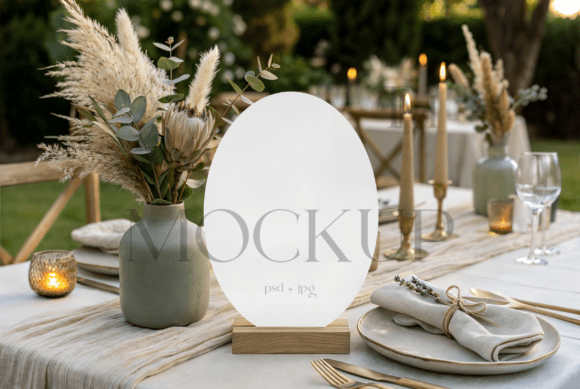
Modern Oval Wedding Sign Mockup: A Guide to Professional Presentation
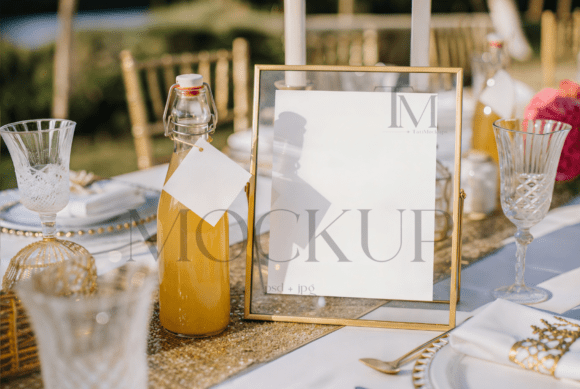
Presenting your digital stationery designs effectively is often the difference between a browser scrolling past and a client clicking "buy." In the competitive world of wedding invitations and signage, the Modern Oval Wedding Sign Mockup has become an essential tool for designers who want their work to shine. This specific type of template offers a clean, minimalist table setup with subtle, natural lighting, perfectly suited for Japandi, Scandi, or modern-luxe aesthetics. However, simply downloading a file isn't enough. Many creators overlook critical details when selecting and using these assets, leading to presentations that feel generic or technically flawed. By understanding common pitfalls and adopting a strategic approach, you can ensure your portfolio looks as professional as the designs you create.
Understanding the Value of Specialized Mockups
A mockup is more than just a background image; it is a contextual stage for your art. The appeal of a 5x7 oval wedding sign mockup lies in its ability to simulate reality. When potential clients see your design on a physical card, sitting on a textured table with realistic shadows, they can visualize the final product. This psychological bridge is vital for selling digital downloads or custom services. The modern aesthetic, characterized by neutral tones and soft lighting, allows your typography and graphics to take center stage without competing with a busy background. Yet, many beginners make the mistake of choosing a mockup based solely on the thumbnail image, ignoring the technical specifications and licensing terms that govern its use.
Common Mistakes That Undermine Your Design
One of the most frequent errors designers make is neglecting to check the resolution and layer structure before purchasing or downloading. A low-resolution PSD file might look acceptable on a small screen but will appear pixelated when exported for high-quality marketing materials or print proofs. Always verify that the file includes Smart Object layers. These are non-destructive containers that allow you to insert your 5x7 design seamlessly. Without them, you are forced to manually warp and shade your image, a time-consuming process that rarely yields realistic results. If you skip this step, your final presentation may lack the authentic depth and perspective that convince customers of your professionalism.
Another significant oversight involves ignoring the lighting and color profile of the scene. A common misconception is that any bright, white background works for every design. In reality, if your design features warm earth tones but the mockup uses cool, blue-tinted daylight, the colors will clash, making your artwork look unnatural. This mismatch can confuse clients about the true color of your product. Furthermore, some users attempt to force rectangular designs into oval frames without adjusting the canvas size, resulting in awkward cropping or empty white space that ruins the composition. Taking a moment to align your graphic with the card's dimensions inside the Smart Object is crucial for a polished look.
Licensing and Usage Misunderstandings
Beyond technical execution, legal and ethical usage is an area where many creators stumble. It is tempting to treat a downloaded mockup as a free-for-all asset, but this can lead to serious issues. A critical rule to remember is that reselling the mockup itself is strictly prohibited. You are purchasing the right to display your work within the scene, not to redistribute the scene as your own product. Violating these terms can damage your reputation and lead to copyright strikes on platforms like Etsy or Creative Market. Additionally, while you are generally allowed to modify the image and apply filters to align with your branding, removing watermarks from preview files or claiming the photography as your own is unethical and illegal. Always read the Terms and Conditions carefully to understand the scope of your license.
Practical Steps for Flawless Integration
To avoid these pitfalls and maximize the potential of your Modern Oval Wedding Sign Mockup, follow a disciplined workflow. Start by launching Photoshop and locating the Smart Object layer, usually indicated by a small icon on the layer thumbnail. Double-click this icon to open the separate document window. Here, drag your high-resolution graphic onto the template. Take care to adjust the image size so it fits perfectly within the safe zones of the card. Once aligned, save the Smart Object file. Photoshop will automatically update the main composition, applying the correct lighting, shadows, and texture maps to your design. This method ensures that your artwork interacts with the environment realistically, maintaining the integrity of the original photograph.
Before finalizing your export, consider the context in which the image will be viewed. If you are creating social media content, you might crop the image to a square or vertical format, ensuring the oval sign remains the focal point. For website banners, a wider crop may be necessary. Remember that the original files typically come without watermarks only after purchase; using watermarked previews for commercial purposes is a mistake that can erode trust with your audience. If the lighting in the mockup doesn't quite match your brand palette, utilize adjustment layers like Color Balance or Curves to subtly tweak the overall tone without altering the underlying texture of the table or paper.
Evaluating Quality Before You Commit
When browsing for the right asset, look for indicators of quality beyond the initial render. Does the description mention "high-res JPG" alongside the PSD? This suggests the creator provides versatile options for quick sharing. Is the lighting described as "natural"? This usually implies softer shadows and more accurate color representation compared to harsh studio setups. Check if the mockup supports the specific dimensions you need, such as the standard 5x7 inch format. A versatile file that allows for easy customization saves you hours of editing time. Moreover, ensure the seller clarifies that stationery designs shown are for display purposes only, confirming that you are buying a tool, not a finished design.
Ultimately, the goal is to create a seamless visual experience for your clients. By avoiding the trap of low-quality files, respecting licensing agreements, and mastering the Smart Object workflow, you elevate your brand perception. A well-executed mockup tells a story of attention to detail and professionalism. It assures the customer that if they hire you or buy your template, the result will be equally meticulous. Whether you are a freelancer building a portfolio or a small business owner launching a new collection, treating your mockups with the same care as your designs is the key to standing out in a crowded marketplace.
In conclusion, the Modern Oval Wedding Sign Mockup is a powerful asset when used correctly. It bridges the gap between digital files and tangible reality, offering a lifestyle presentation that resonates with modern couples. By staying vigilant about technical requirements, adhering to ethical usage guidelines, and applying thoughtful adjustments, you can transform a simple PSD file into a compelling marketing tool. Avoid the shortcuts that lead to poor quality, and instead invest time in learning the proper techniques. Your effort will pay off in the form of higher engagement, increased sales, and a reputation for excellence in the wedding industry.